Save value: the bot stores data in a variable
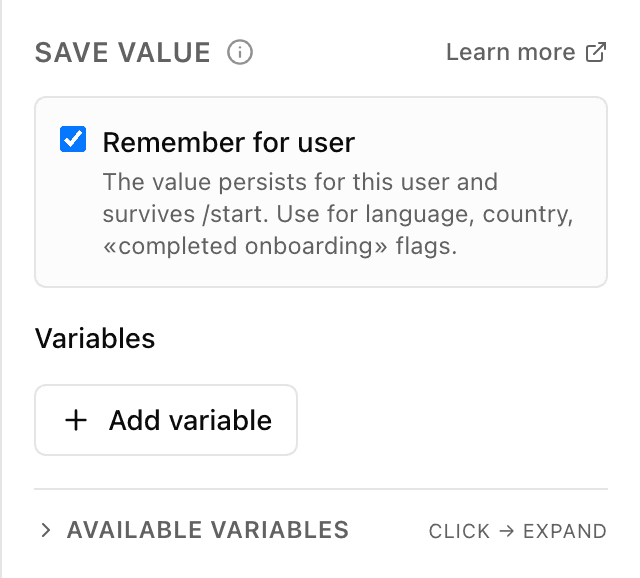
What the "Save value" block does
Unlike the "Ask" block, here the bot asks the person nothing — it writes the value you set into a "cell" (a variable) itself. The person doesn't see it. Later in the flow the saved value can be inserted into a message via {{...}} or used in conditions and calculations — for example to mark that the customer chose pickup.
Block settings
The block's settings panel — what to fill in:
- Cell name
- The name of the variable to save the value into — for example chosen_city. Written in lowercase Latin letters, digits and underscore. Some system names are reserved — the panel flags a name you can't use.
- Value
- What exactly to store in this cell: fixed text (for example "pickup") or a value gathered earlier via {{...}}.
- Attach to the person permanently
- A checkbox: attach the value to the person (it stays in their card and in future conversations) or remember it only within this conversation. Only within this conversation by default.
Example: mark the customer's choice
The customer tapped "Pickup" — the next step, a "Save value" block, puts "pickup" into the variable delivery_type. Later in the flow the bot checks this cell and skips asking for a delivery address.
Frequently asked questions
How is "Save value" different from the "Ask" block?
"Ask" puts a question to the person and remembers their answer. "Save value" asks nothing — the bot itself writes the value you set into a variable. The person doesn't see it.
Why isn't the cell name accepted?
The name must be lowercase Latin letters, digits and underscore, and must not start with a digit. Some names are also reserved for the bot's system needs and can't be used. If the field turns red, change the name.
What does "attach to the person permanently" mean?
Without the checkbox the value lives only in the current conversation and is forgotten afterwards. With it, the value is attached to the person — it stays in their card and is available in later conversations with the bot.
Other blocks in this group
Ask
The bot asks a question and remembers what the person answers. For example, it asks for a name or a delivery address.Phone / location
With one button the bot asks for a phone number or location. For example, a number for the courier to call or a delivery point on the map.Calculator
Calculates using a formula and remembers the result. For example, work out the discounted order total or the delivery cost.List (cart)
Collects chosen items into a cart list: add, remove or clear. For example, the customer picks products with buttons and the bot shows the cart and total.Survey
Asks the customer for a rating and, if needed, a comment. For example, rate the service from 1 to 5 after an order.Tag
Adds or removes labels on the customer. For example, mark bought or interested in delivery, then use labels to build a mailing.Launch your Telegram bot with Forgebot
Build your first flow, reply to subscribers and watch analytics — free, no code.
Free plan: 1 bot, 5 flows, 100 subscribers. No card required.