Phone / location: the bot asks for a number or a map point with a button
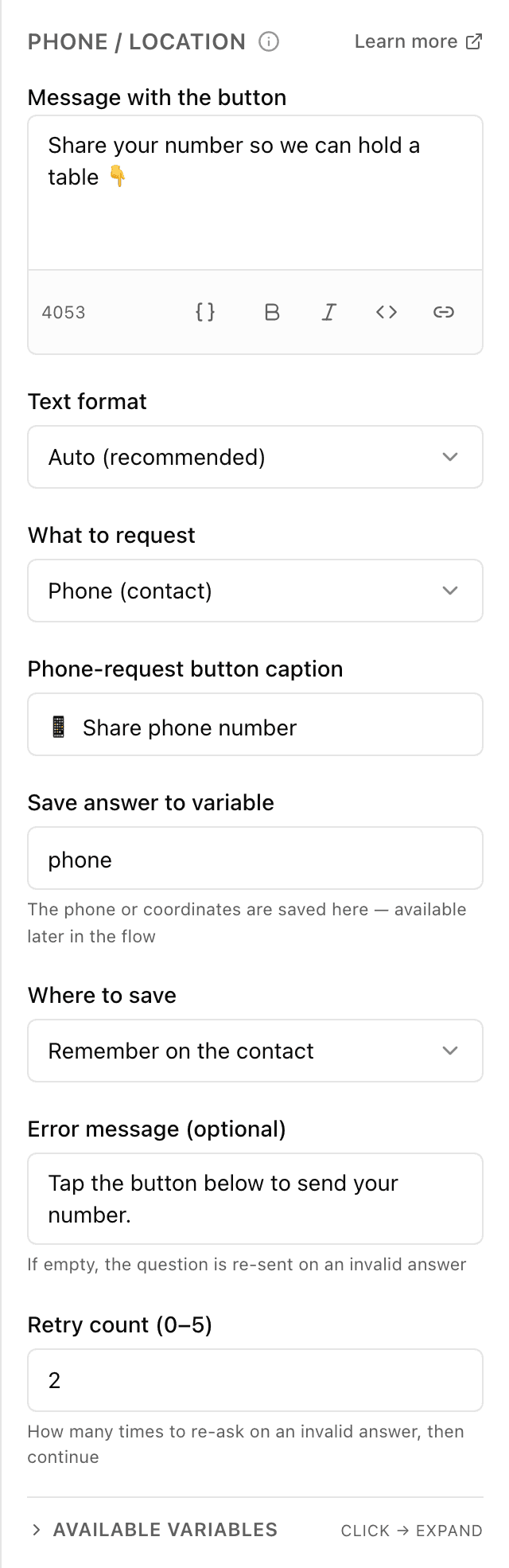
What the "Phone / location" block does
The bot sends a message with a "share number" (or "share location") button. The person doesn't have to type — they tap the button, and Telegram itself passes the bot the number from their account or their current coordinates. The bot remembers it in a "cell" (a variable) to call, arrange delivery or save the contact.
Block settings
The block's settings panel — what to fill in:
- Request text
- The message the bot sends before the button — for example "Leave a number, the courier will call before delivery". You can insert a saved value via {{...}}. Up to 4096 characters (a counter flags overflow).
- Text format
- How to read the text's formatting (bold, italic, links): automatically or in a specific format. Automatic by default.
- What to request
- What the bot asks the person for: a phone number or a location. Phone by default.
- Button label
- The words on the Telegram button the person taps to share the number or location — for example "Share number". Up to 256 characters.
- Variable name
- The name of the "cell" where the bot writes the received number or coordinates to use later — for example phone. Latin letters, no spaces, not starting with a digit.
- Where to remember
- Remember the answer only within this conversation or attach it to the person permanently. Attached to the person (contact) by default.
- Message if the button wasn't tapped
- Optional: what the bot writes if the person typed text instead of tapping the button. Leave it empty and the bot repeats the original request. Up to 4096 characters.
- How many times to re-ask
- How many times the bot repeats the request before moving on. From 0 to 5, 2 by default.
Example: a number for the courier
Before arranging delivery the bot writes "Leave a number — the courier will call from your door" with a "Share number" button. The person taps it, Telegram passes the number, and the bot saves it to the variable phone.
Frequently asked questions
Does the person have to share the number?
No. Telegram shows the button, but the person can ignore it and type text or send nothing. For that case set the "Message if the button wasn't tapped" and the number of retries — the bot reminds them politely that many times, then moves on.
Where does the bot get the number and coordinates?
Telegram fills in the number from the person's account — no typing, so there are no typos. The location is the current point on the map the person shares at the moment they tap the button.
How is "Phone / location" different from the "Ask" block?
In "Ask" the person types the answer themselves, which is easy to mistype. "Phone / location" offers a button, and Telegram passes the exact number or coordinates itself — faster and typo-free.
Other blocks in this group
Ask
The bot asks a question and remembers what the person answers. For example, it asks for a name or a delivery address.Save value
Saves a value to use later. For example, store the chosen city and then insert it into messages.Calculator
Calculates using a formula and remembers the result. For example, work out the discounted order total or the delivery cost.List (cart)
Collects chosen items into a cart list: add, remove or clear. For example, the customer picks products with buttons and the bot shows the cart and total.Survey
Asks the customer for a rating and, if needed, a comment. For example, rate the service from 1 to 5 after an order.Tag
Adds or removes labels on the customer. For example, mark bought or interested in delivery, then use labels to build a mailing.Launch your Telegram bot with Forgebot
Build your first flow, reply to subscribers and watch analytics — free, no code.
Free plan: 1 bot, 5 flows, 100 subscribers. No card required.