Calculator: the bot computes by a formula and remembers the result
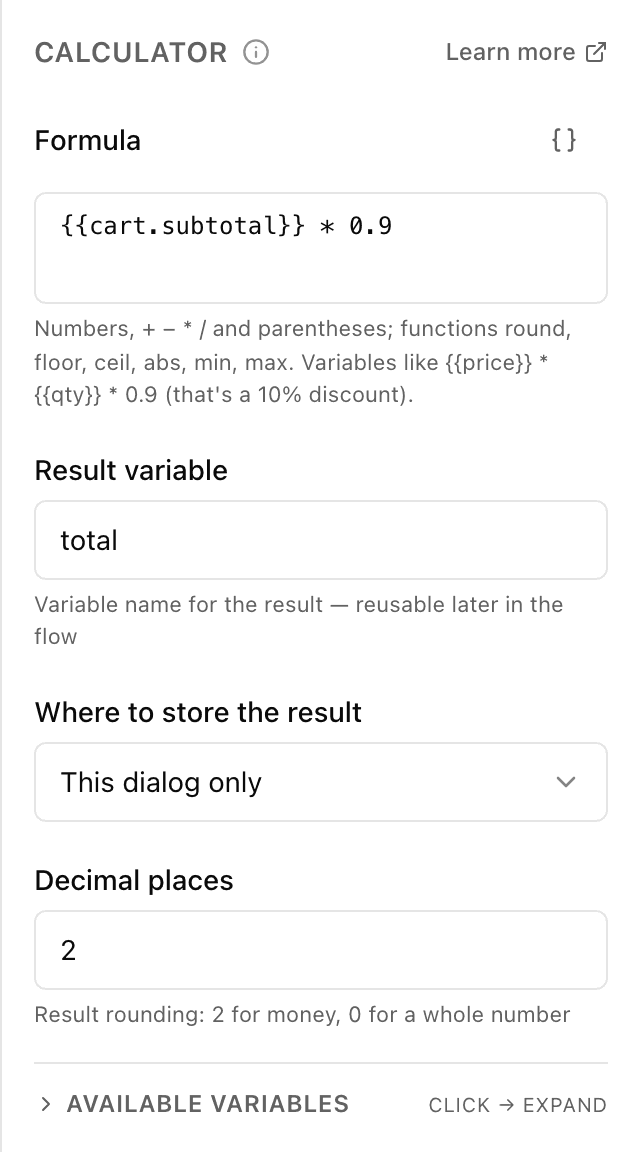
What the "Calculator" block does
The bot takes your formula, plugs in values gathered earlier (a price and a quantity, say) and computes the result. The calculation runs on the server — the person doesn't see it, they only get the finished figure where you choose to show it. The bot remembers the result in a "cell" (a variable) to insert into a message or use later.
Block settings
The block's settings panel — what to fill in:
- Formula
- The calculation itself — for example {{price}} * {{qty}} * 0.9 (price × quantity with a 10% discount). You can use numbers, the signs + − * /, brackets and the functions round, floor, ceil, abs, min, max. Up to 500 characters.
- Result variable
- The name of the "cell" to put the result into — for example total. Latin letters, no spaces, not starting with a digit.
- Where to store the result
- Remember the result only within this conversation or attach it to the person permanently. Only within this conversation by default.
- Decimal places
- How many digits to keep after the decimal point: 2 for money (500.00), 0 for a whole number. From 0 to 8, 2 by default.
Example: order total with a discount
The customer chose 3 coffees at 80 UAH. The "Calculator" block computes {{price}} * {{qty}} * 0.9 as 216.00 and puts the result into the variable total. Next the bot issues an invoice for that amount with the "Payment" block.
Frequently asked questions
How do I insert a price or quantity into the formula?
Tap the braces button {} next to the formula field and pick the variable from the list — it's inserted as {{name}}. These are values the bot gathered earlier (via the "Ask" block, say) or the bot's global variables.
Which operations and functions can I use?
Numbers and the signs for addition, subtraction, multiplication and division (+ − * /), brackets for order of operations, and the functions round, floor, ceil, abs, min, max — rounding, absolute value, minimum and maximum. The formula itself is checked on the server when you save.
How is "Calculator" different from the "Save value" block?
"Save value" just puts a ready value into a cell. "Calculator" first computes by a formula (multiplies, adds, rounds) and only then stores the resulting number.
Other blocks in this group
Ask
The bot asks a question and remembers what the person answers. For example, it asks for a name or a delivery address.Phone / location
With one button the bot asks for a phone number or location. For example, a number for the courier to call or a delivery point on the map.Save value
Saves a value to use later. For example, store the chosen city and then insert it into messages.List (cart)
Collects chosen items into a cart list: add, remove or clear. For example, the customer picks products with buttons and the bot shows the cart and total.Survey
Asks the customer for a rating and, if needed, a comment. For example, rate the service from 1 to 5 after an order.Tag
Adds or removes labels on the customer. For example, mark bought or interested in delivery, then use labels to build a mailing.Launch your Telegram bot with Forgebot
Build your first flow, reply to subscribers and watch analytics — free, no code.
Free plan: 1 bot, 5 flows, 100 subscribers. No card required.