Ask: the bot puts a question and remembers the answer
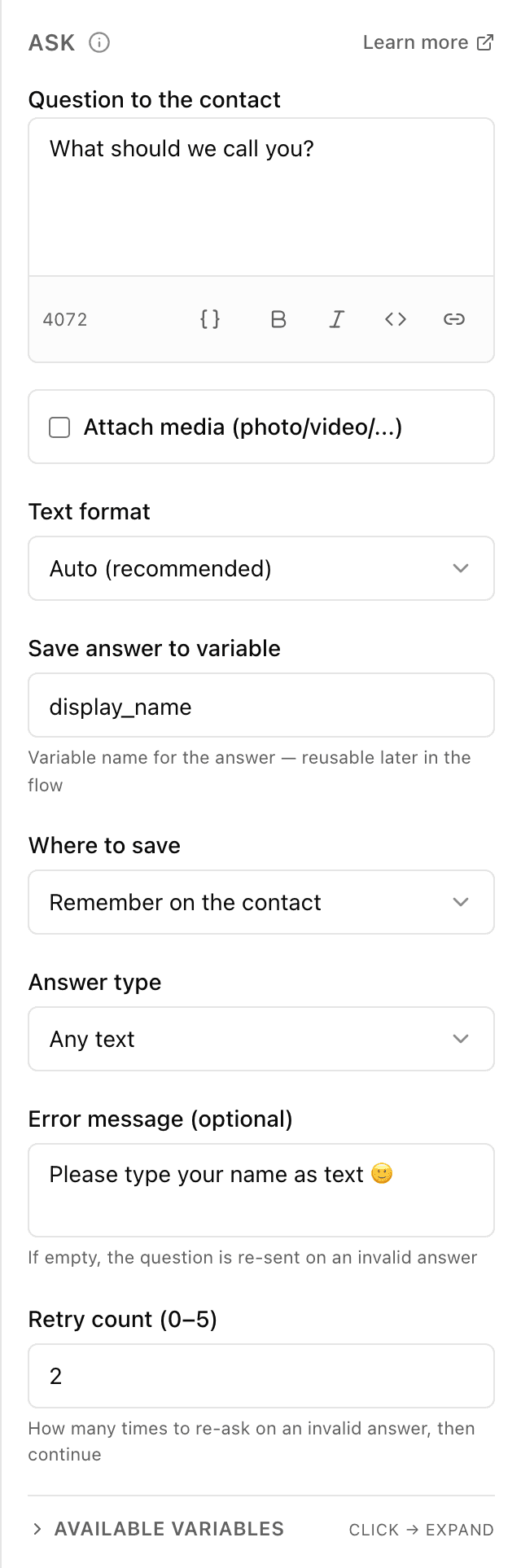
What the "Ask" block does
The bot sends the person a question and pauses until they reply. It remembers the answer in a "cell" (a variable) — you can then insert it into other messages or attach it to the customer. If you set what kind of answer to expect (an email, say), the bot checks it and politely re-asks when the person gets it wrong.
Block settings
The block's settings panel — what to fill in:
- Question text
- The question the bot sends the person in chat — for example "What's your name?". You can insert a saved value via {{...}} and format text bold or italic. Up to 4096 characters (a counter flags overflow).
- Attach media
- Optional: attach a photo, video, GIF, audio, voice note or file to the question — the question text then becomes its caption. The file is given as an https link the server checks on save.
- Text format
- How to read the question's formatting (bold, italic, links): automatically or in a specific format. Automatic by default.
- Variable name
- The name of the "cell" where the bot saves the answer to use later — for example email or name. Latin letters, no spaces, not starting with a digit.
- Where to remember
- Remember the answer only within this conversation or attach it to the person permanently. Only within this conversation by default.
- Answer type
- What kind of answer to expect: any text, email, phone or a number. If the answer doesn't fit, the bot asks again. Any text by default.
- Message on a wrong answer
- Optional: what the bot writes if the person answered in the wrong form (a malformed email, say). Leave it empty and the bot simply repeats the question. Up to 4096 characters.
- How many times to re-ask
- How many times the bot re-asks before it stops waiting for a valid answer and moves on. From 0 to 5, 2 by default.
Example: a delivery address
The bot writes "Where should we deliver?", the person sends the address, and the bot saves it to the variable address. If a phone is needed next, another "Ask" block with the answer type "phone" checks the number and re-asks if the format is wrong.
Frequently asked questions
What happens if the person answers in the wrong way?
If you picked an answer type (email or phone, say) and the person answered incorrectly, the bot sends the error message (or repeats the question) and waits again — as many times as set in "How many times to re-ask" (0 to 5). After that the flow moves on.
Where do I get the saved answer later?
The answer sits in the variable with the name you set. In any later block you can insert it via {{name}} — for example "Thanks, {{name}}!". If you keep it "attached to the person", the answer stays with the customer in future conversations too.
How is "Ask" different from the "Phone / location" block?
"Ask" waits for the person to type an answer as text. "Phone / location" offers a button that lets Telegram share the number or location itself — the person doesn't type them by hand.
Other blocks in this group
Phone / location
With one button the bot asks for a phone number or location. For example, a number for the courier to call or a delivery point on the map.Save value
Saves a value to use later. For example, store the chosen city and then insert it into messages.Calculator
Calculates using a formula and remembers the result. For example, work out the discounted order total or the delivery cost.List (cart)
Collects chosen items into a cart list: add, remove or clear. For example, the customer picks products with buttons and the bot shows the cart and total.Survey
Asks the customer for a rating and, if needed, a comment. For example, rate the service from 1 to 5 after an order.Tag
Adds or removes labels on the customer. For example, mark bought or interested in delivery, then use labels to build a mailing.Launch your Telegram bot with Forgebot
Build your first flow, reply to subscribers and watch analytics — free, no code.
Free plan: 1 bot, 5 flows, 100 subscribers. No card required.