Telegram bot analytics: subscribers and flows
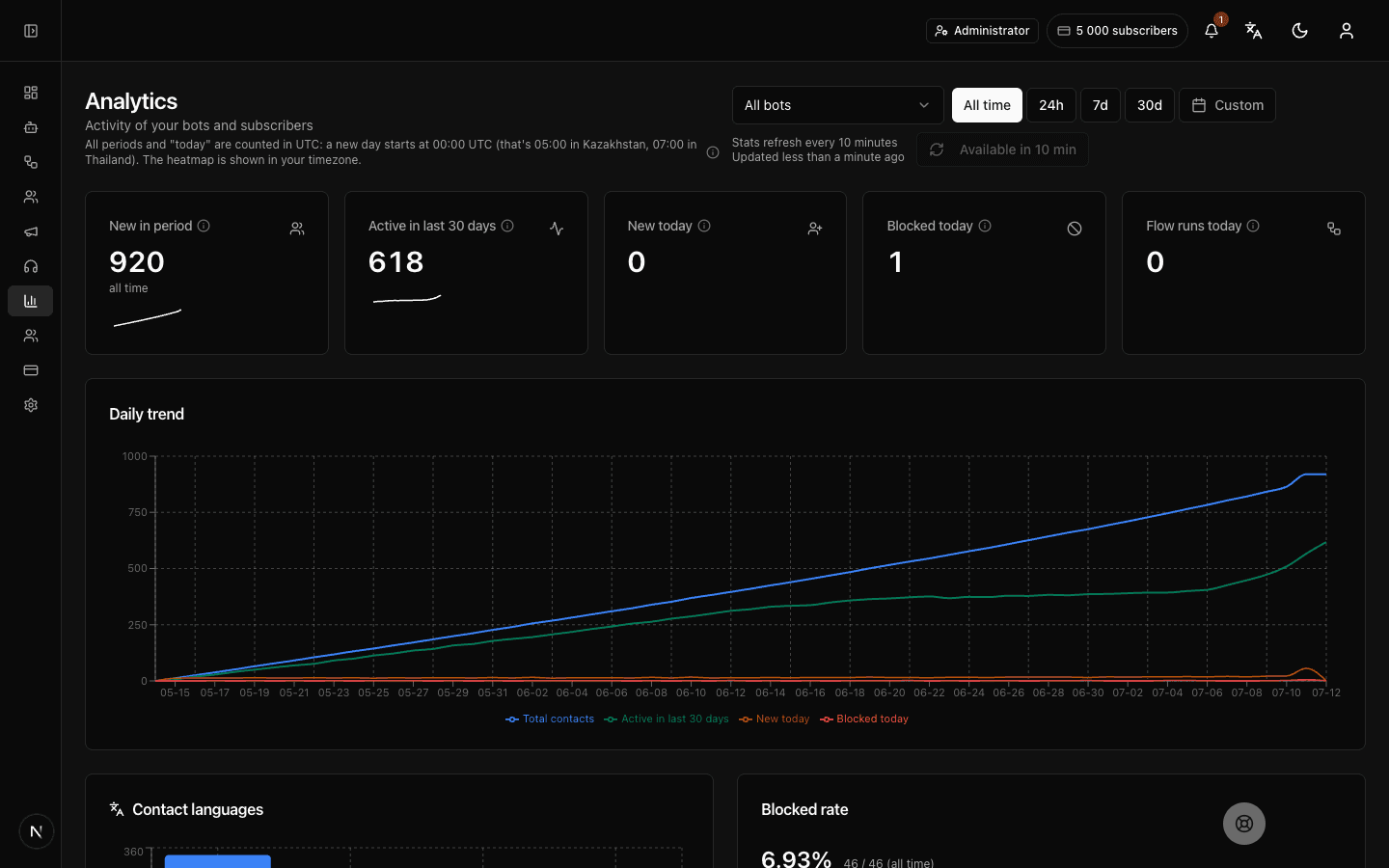
What the Telegram bot metrics dashboard shows
Telegram bot subscriber statistics — across all bots at once and per bot. Updates automatically, no manual reports.
Audience growth
Daily dynamics: total subscribers, new and blocked today. Spikes are easy to match against ad launches and broadcast dates.
30-day active
How many subscribers actually interacted with the bot in the last 30 days. The window is rolling — the metric honestly drops when the base goes quiet.
Cohort retention
Do subscribers come back: a weekly cohort retention table. You see what share of newcomers keeps using the bot week after week.
Hourly activity
A heatmap by hour and weekday — when your audience is online, to plan content and broadcast timing.
Audience languages
The language distribution of subscribers — you see who to localize flows for and which language to write broadcasts in.
Per bot
Top bots, flow runs and a separate analytics page for every bot — handy when you run several bots for different jobs.
How to see your Telegram bot statistics
No separate counters, pixels or code: statistics collect themselves as soon as the bot runs through the platform — from connection to your first data-driven decisions.
Connect the bot
Add your bot with the token from BotFather — from that moment subscriber events are recorded automatically: subscriptions, messages, blocks, flow runs. Nothing else needs configuring.
Open the dashboard
The overview dashboard aggregates every bot in the account: daily dynamics, active in 30 days, block rate, languages and the heatmap. Fresh numbers arrive on their own — no manual page refresh.
Drill into a specific bot
Every bot has its own analytics page: compare audiences across bots and find where your flows perform best. The overview dashboard stays a summary of the whole account.
Make decisions on numbers
Check the heatmap before a broadcast, the block rate after a flow change, and the retention cohorts once a week — that is how product changes show up in audience behaviour. Numbers without actions are just pretty charts.
Which bot metrics to watch — and why
A short walkthrough: five metric groups that show the health of a Telegram bot — and what to do about each.
Growth: new & total
The base of any analytics: how many subscribers arrive per day and how the total changes. Match sharp spikes against ad launches and posts — and read the weekly trend, not a single day.
Activity & hours
Active-in-30-days and the hourly heatmap show what share of the base is alive and when to catch it with a message. A sleeping base is a reason to fix flows, not to buy more traffic.
Retention
Cohorts answer the main question: do people come back after the first contact or leave within a week. If cohorts melt, fix the first dialog first — the impression is decided there.
Blocks
The share of subscribers who blocked the bot is an early signal that the flow or message frequency annoys: watch it after every change. The trend matters more than the absolute number.
Flow runs
How often flows fire — you see which entry points work and which blocks nobody passes. Rework or switch off the weak entry points.
Statistics you can trust
We deliberately measure what can be measured honestly — and we say plainly how the data works. No inflated promises.
No counters, no code
There is nothing to embed: events arrive from Telegram as the bot works. Statistics start accumulating the moment the bot is connected to the platform — the first chart appears with your first subscribers.
Subscribers, not channel reach
We analyse your bot's audience: growth, activity, retention, languages. Views and reach of public channels are a fundamentally different job — and we do not claim it.
Honest update cadence
The dashboard recalculates automatically every few minutes and refreshes when you return to the tab. It is not a second-by-second feed — and we honestly do not promise one: for broadcast and content decisions this cadence is enough.
Only you see your numbers
Account data is isolated at the database level, and access to analytics inside the team is governed by roles and permissions — you can share the numbers with a colleague without opening settings or billing.
Telegram bot analytics — FAQ
What is Telegram bot analytics?
It is Telegram bot statistics at the subscriber level: audience growth and activity, cohort retention, block rate, language distribution, and an hourly heatmap. Every metric is computed from the events Telegram delivers to your bot: subscriptions, messages, blocks, flow runs. The data covers your bot's subscribers (updated periodically), not the reach of a public channel.
Is this Telegram channel analytics?
No. Forgebot analyses your bot's subscribers — growth, activity, retention. Views and reach of public channel posts are a fundamentally different class of tools, and we do not claim it.
Does the data update in real time?
The dashboard pulls fresh data periodically and when you return to the tab — no manual refresh; it is not a second-by-second feed. The freshness is enough for working decisions: broadcasts, support shifts, content planning.
Which metrics are included?
Daily dynamics, total/new/active-in-30-days, blocked subscribers and their share, cohort retention, languages, the hourly heatmap, flow runs and top bots. The full set is visible on the overview dashboard and per bot.
Can I view a single bot?
Yes, every bot has its own analytics page; the overview dashboard aggregates all bots in the account. Handy when bots do different jobs: a shop, support, bookings.
Why do subscribers block a bot, and what can I do?
Most often — messages that are too frequent or irrelevant. Watch the block rate after every broadcast and flow change: if it grows, reduce the frequency and segment the audience so messages reach only the people they are useful to. A healthy habit is to watch the week-over-week trend.
From what moment does the data accumulate?
From the moment the bot is connected to the platform: subscriber events are recorded automatically, nothing needs switching on. The longer the bot runs, the richer the retention cohorts and the heatmap.
Is analytics available for free?
Yes, analytics is included in the free plan — within its limits (1 bot, 100 subscribers). The metric set is the same on every plan.
Launch your Telegram bot with Forgebot
Build your first flow, reply to subscribers and watch analytics — free, no code.
Free plan: 1 bot, 5 flows, 100 subscribers. No card required.