A visual Telegram bot builder
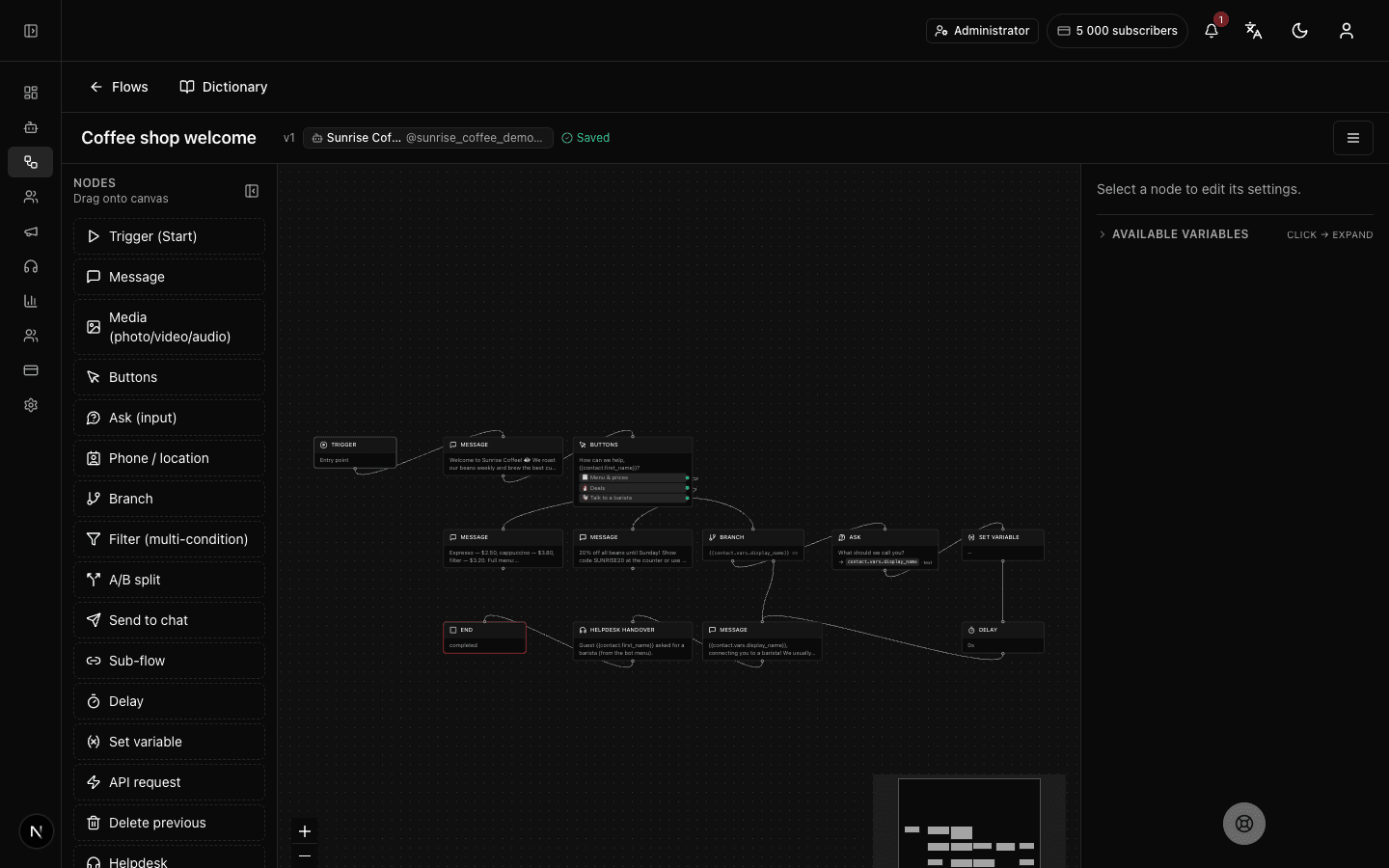
Everything to build a Telegram bot — no code
Real editor blocks and tools — what actually runs on the server.
26 block types
Start, messages, media, buttons, branches, conditions, pauses, payments, variables, API requests, operator handover and more. The full list is in the palette below.
No code
Build the logic by dragging blocks on a canvas. No programming needed: flow connections are visible at a glance, so the logic reads as a whole.
Drafts & versions
Edit a draft, publish in one click and roll back to previous versions. Subscribers only see what is published — intermediate edits never touch them.
Variables & data
Save values into variables, insert them into messages and store contact data. Interpolation works in any message of the flow.
API requests
GET/POST requests to external services with field extraction and SSRF protection. The service response unpacks into variables.
Flow localization
A separate translation dictionary per flow — one bot in several languages. The language is picked by the subscriber's language.
26 block types — the bot's full mechanics
Every block runs on the server and is visible in the editor. No “coming soon” — this list is what already works. The groups are for readability: in the editor all blocks live in one palette.
Messages and media
A formatted message, photo and video sending, inline buttons, deleting the previous message — everything a live dialog is made of. Formatting works like regular Telegram: bold, italics, links.
Input and data
A question that saves the answer, phone and location requests via reply buttons, variables — subscriber answers land in the contact card and keep working in the flow. No external forms — everything stays inside the conversation.
Logic and experiments
A yes/no branch, conditions with comparisons and ranges, an A/B test — the flow decides where to lead a subscriber and tests hypotheses honestly. Conditions combine: from a simple yes/no to a chain of checks.
Time and series
Delays from minutes to 30 days — warm-up sequences and reminders run on their own, with no manual launches. A delay is a block too: it goes anywhere in the chain.
Integrations
A request to an external API with variable interpolation and secrets, a message to the team chat, payment collection right in Telegram — the bot connects Telegram to your systems. Secrets are stored separately and never show up in the flow.
Structure and people
A start trigger, sub-flows for reusing logic, operator handover and the end block — the skeleton everything else stands on. One flow can call another like a subroutine.
How to launch a Telegram bot: from token to analytics in four steps
You don't need to be a developer. Connect your bot, build a flow, talk to people, and watch the numbers.
Connect your bot
Paste your BotFather token — the connection is set up automatically.
Build a flow
Drag blocks in the visual editor. No code required.
Talk to people
Reply to subscribers in a shared team inbox.
Watch analytics
Track subscribers and flow runs for each bot.
Your first Telegram bot in 5 steps
From a token to a working bot — no code and no developer. Growing the bot follows the same habits: build, publish, verify.
Get a token from BotFather
Create a bot with the /newbot command in the official BotFather — Telegram issues a token. It is the standard step for any bot and takes a couple of minutes. The token is the bot's key: treat it like a password.
Connect the bot to the platform
Paste the token in the workspace — the bot links to your account, and subscriber events immediately start flowing into the CRM and analytics. The webhook is configured automatically — nothing to do by hand.
Assemble the flow on the canvas
Drag blocks and connect them with arrows: a /start greeting, a button menu, answers to routine questions. Blocks can be copied — even between flows. Start with a simple menu — grow it once real customer questions arrive.
Publish the draft
The flow is edited as a draft and goes live with one click. Version history is kept — a bad change rolls back just as fast.
Try it in Telegram
Open your bot in Telegram and walk the flow as a subscriber. Runs and audience behaviour show up in analytics right away — improve it by the numbers. The best five minutes of testing before you launch any ads.
Building bots — questions
What is a Telegram bot builder?
It is a tool — also called a Telegram chatbot builder — for assembling a bot from ready-made blocks without coding: messages, buttons, conditions, delays, API calls. In Forgebot you build the flow visually from 26 block types, the logic runs on the server, and changes ship through drafts and version history.
Do I need to know how to code?
No. You can create a Telegram bot without programming right on the canvas: the flow is assembled from ready-made blocks, no code required. If an edit goes wrong — roll back to a previous version.
What blocks can I use?
26 types: start (trigger), message, media, inline buttons, ask-and-save input, phone & location request, branch, conditions (filter), A/B test, payment, rating survey (NPS), client tag (segmentation), team-chat message, sub-flow, pause up to 30 days, wait until a specific time, waiting for data from an external service (webhook), save value (variables), calculator, list-cart, API request, message deletion, channel-subscription check, AI assistant (replies in its own words), operator handover and end.
Can I reuse parts of a flow?
Yes, in two ways: move repeating logic into sub-flows and call them from different places, and copy-paste blocks — including between flows. That is how big bots avoid turning into a tangle of blocks.
Can the bot reply automatically?
Yes — that's Telegram bot automation at work: triggers fire on commands and messages, auto-replies follow the flow, and delays up to 30 days power drip sequences. No code needed — the builder doubles as Telegram automation software.
Is the builder a fit for business and teams?
Yes, it works as a Telegram bot builder for business and teams: bots are shared across the account, access is split with roles and precise permissions — who edits flows, who replies to subscribers — and the team handles customer conversations in a shared inbox.
Is this an AI builder?
By default, no: flows run on clear rules and do exactly what you draw — such a bot will not invent a discount or promise too much. When you do want AI, add the AI-assistant block: it answers free-form questions within the role and knowledge you set, on your own company's key with the provider you choose, and can hand the conversation over to an operator.
How do I ship changes?
Edit the draft and publish in one click. There is version history with rollback. While you edit the draft, subscribers keep using the published version.
How many bots and flows can I create?
The free plan includes 1 bot and 5 flows — enough to build and launch your first bot. On paid plans the caps grow with the tier: more bots, flows and team seats. Current limit usage is visible in the workspace — you can tell when it is time to grow.
Is there a free plan?
Yes, with small limits: 1 bot, 5 flows and 100 subscribers. No card required. Paid plans raise the caps: from 3 bots and 25 flows.
Launch your Telegram bot with Forgebot
Build your first flow, reply to subscribers and watch analytics — free, no code.
Free plan: 1 bot, 5 flows, 100 subscribers. No card required.