Telegram shared inbox: live customer support for your bot
Everything for live Telegram support
Real support-team tools — the way they work in the product.
Live chat
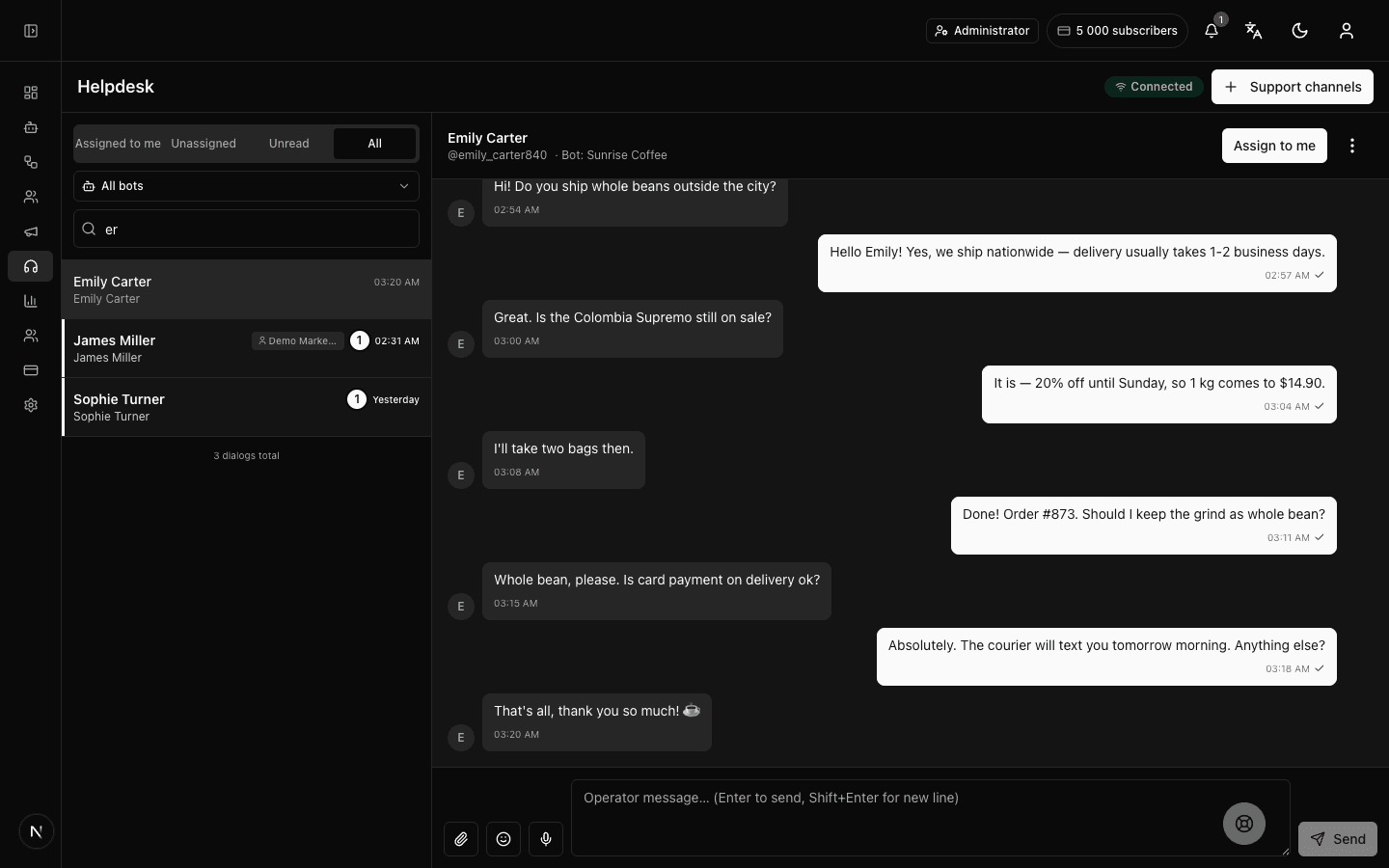
Live chat with customers: subscriber messages reach operators instantly — no page reloads. A connection indicator shows the panel is online.
Operator handover
A “hand over to an operator” block in the flow: the bot opens a live conversation at the right moment — for example, behind a “Talk to a human” button in the bot menu.
Telegram forum topics
Every conversation is a separate topic in your Telegram group: reply from the panel or straight from Telegram. The setup wizard takes a few minutes.
Website live chat
A chat widget for your site: visitors write without Telegram, photos and PDF work both ways, and the conversation lands in the same shared inbox. The link and embed code live in the channel settings.
Dialog assignment
Assign a conversation to a specific operator — the team sees who owns the dialog and never answers the same request twice.
Blocking & filters
Block spammers, unblock them, and filter conversations by status and bot — spam never gets in the way of real customers.
Team & roles
Multiple operators with precise permissions: who sees conversations, who replies, who configures — from view-only to full management.
How customer support through a Telegram bot works
Five steps from “customers message the bot” to “the team replies from one window” — no email and no third-party messengers.
Connect a Telegram group
The setup wizard walks you through it: you create a group with forum topics and give the bot admin rights, and the platform links it to your bot. It takes a few minutes and is done once.
Add an operator handover to the flow
The “hand over to an operator” block goes anywhere in the flow: the bot answers routine questions itself and opens a live conversation exactly when a person needs a person.
Reply from a single window
Subscriber conversations land in a shared inbox: new messages appear instantly, and photos, videos and voice messages arrive in the same thread — context is never lost.
Split the work across the team
Assign a conversation to a specific operator, filter by status and bot, and separate access with roles — the team never answers the same request twice.
Reply from the panel or from Telegram
Every conversation is a topic in your Telegram group: an operator can reply from the panel at a desk or straight from the Telegram app on a phone. The customer will not notice a difference — the reply arrives from the bot as a regular message.
A shared inbox, not a ticketing system
For live messenger support, tickets are extra bureaucracy. Here is why we deliberately built a shared inbox.
Speed over statuses
A customer in a messenger expects an answer in minutes, not a “your request has been registered” email. Live chat removes the extra layer: the operator replies right where the customer asked — in Telegram, like a normal conversation.
Context is never lost
The whole conversation history is kept: an operator sees what colleagues have already answered and never makes the customer repeat the question. A new operator picks up the thread without a retelling.
A team without collisions
Conversation assignment plus status and bot filters solve the classic shared-chat problem — two people answering the same request while a third goes unclaimed. Assignment can change at any moment — the dialog moves to a colleague with its full history.
What if you do need tickets?
If your process needs request numbers, SLAs and escalations — that is a classic service desk, and we do not pretend to be one. Forgebot is about fast, live customer conversations in Telegram. That self-restraint saves you from rolling out the wrong system.
Telegram customer support — FAQ
What is a Telegram live chat?
It is a shared team inbox where operators reply to bot subscribers in real time. The bot can hand a conversation over to a live operator, several teammates work in one window, with conversation assignment and blocking. It is not a ticketing system — messages flow as a live real-time chat, not as status-tracked tickets. Setup takes a few minutes: you need a Telegram group with forum topics and admin rights for the bot.
Is this a ticketing system?
No. It is a shared team inbox with live chat: no ticket numbers, statuses or SLAs — just conversations with subscribers in one window. If your process needs tracked requests with statuses, we will say it honestly: that is not us.
How fast do messages arrive?
Instantly: new messages appear on their own, without refreshing the page. Under the hood it is a persistent WebSocket connection: the panel receives events immediately instead of polling on a timer; if the link drops, the indicator shows reconnection.
How does the bot hand a dialog to an operator?
There is an operator-handover block in the flow: when a subscriber reaches it, the bot opens a live conversation and the team sees it in the live chat. The block can go anywhere in the flow — for example, behind a “Talk to a human” button.
Can several operators reply?
Yes. Add your team, assign conversations to specific operators, and separate access with roles and permissions. Permissions are detailed: you can grant access to conversations only — without bot settings or billing.
How many operators can work at the same time?
As many as your plan has seats: one on the free plan, from two on paid plans, and the cap grows with the tier. Every operator can get their own role and permission set.
Can operators reply from a phone?
Yes. Every conversation is a topic in your Telegram group, so you can reply straight from the Telegram app — on a phone or tablet, without even opening the panel. New requests arrive in the group as regular Telegram messages — with standard notifications.
Do photos and voice messages from customers come through?
Yes. Photos, videos, voice messages and other attachments arrive in the same conversation; images and videos open in a built-in viewer right in the panel. Voice messages can be played without leaving the conversation.
Can I take messages from my website, not just Telegram?
Yes. Enable the web chat: a client writes from the widget on your page or via a direct link, without a Telegram account. The conversation lands in the same shared inbox and the same team replies; photos and PDF work both ways.
Does Forgebot work as Telegram support software?
Yes. Use it as Telegram help desk software for your business: a shared inbox where several agents (operators) answer subscribers in a Telegram live chat. It is not a ticketing system — no ticket IDs, statuses or SLAs — just live conversations with your customers in one team window.
Is live chat available on the free plan?
Yes: the free plan includes one chat group — live chat works with no card required. That is enough to try support on real customers; more operators and groups come with paid plans from $19 per month.
Launch your Telegram bot with Forgebot
Build your first flow, reply to subscribers and watch analytics — free, no code.
Free plan: 1 bot, 5 flows, 100 subscribers. No card required.