Wait for data: the flow resumes when an external service sends an event
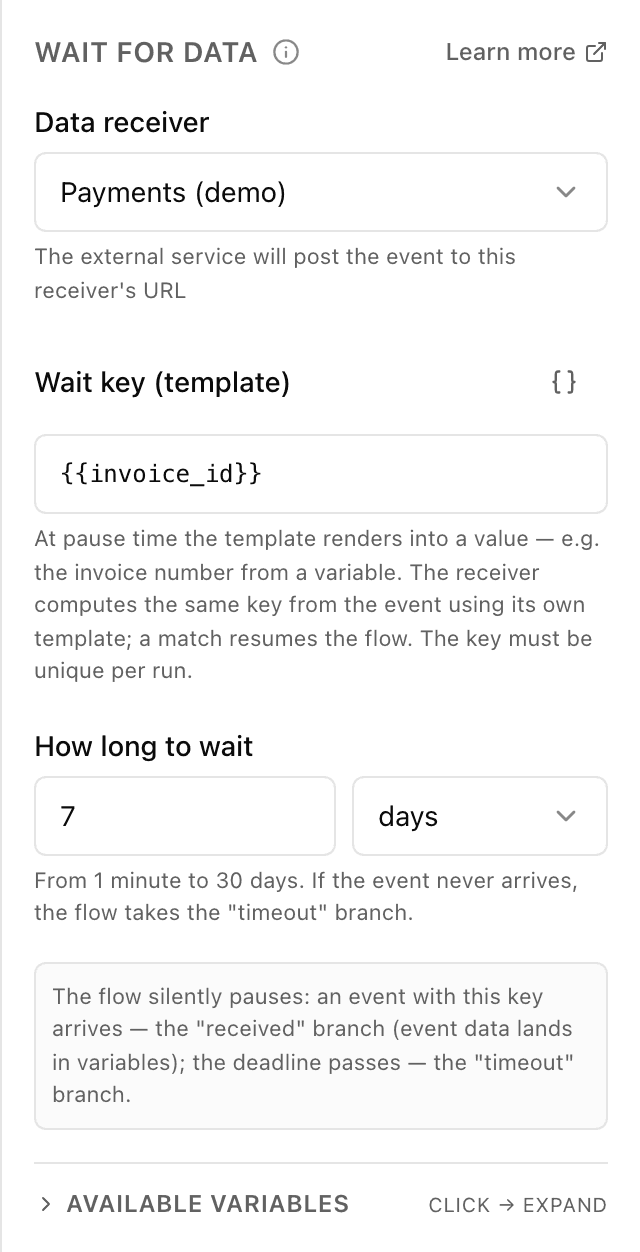
What the "Wait for data" block does
The block connects a flow to the outside world: the bot has issued an invoice or submitted a request — and waits until a third-party service (a payment provider, a CRM, your website) posts an HTTP request to a receiver from the "Data intake" section. For the event to find this exact conversation, the block and the receiver compute the same key — for example, the order number. The customer sees nothing meanwhile: the bot simply stays quiet and continues on its own once the data arrives or the deadline passes.
Block settings
The block's settings panel — what to fill in:
- Data receiver
- Which receiver from the "Data intake" section to listen to. The external service must post the event to that receiver's URL. If you have no receivers yet, create one in "Data intake" first.
- Wait key (template)
- A template for the value that matches the event to this conversation — usually a variable holding the order or invoice number, e.g. {{invoice_id}}. At pause time the template renders into a concrete value; the receiver computes the same key from the incoming data, and a match resumes the flow. Up to 255 characters; the key must be unique per run.
- How long to wait
- The maximum waiting time — a number plus a unit (minutes, hours or days), from 1 minute to 30 days. If the event never arrives, the flow takes the "timeout" branch — typically a "payment not received" message or a reminder.
Example: granting access after a payment
The bot issues an invoice and reaches a "Wait for data" block: receiver — "Payments", key — {{invoice_id}}, limit — 7 days. After the payment, the provider posts an event with that invoice number to the receiver — the flow instantly continues down the "received" branch and sends a link to the private channel. If a week passes with no payment, the "timeout" branch politely reminds about the invoice.
Frequently asked questions
How is "Wait for data" different from "API request"?
"API request" means the bot itself calls an external service and gets an answer right away. "Wait for data" is the opposite: the bot stands by until the external service sends an event on its own — whether that takes a minute or a week. For payments and long-running processes this is the block you want.
How does an event know which conversation to resume?
By the wait key. At pause time the block renders a value from its template (say, the invoice number from a variable), and the receiver computes the same key from the incoming data using its own template. When the values match, the exact run that was waiting for that key resumes.
What does the flow see from the incoming event?
The variables the receiver extracted with its parsing rules (for example, the payment amount and status), plus a service "inbound" block with event metadata. You can use them right away in messages and conditions after the "received" branch.
Other blocks in this group
Payment
The bot issues an invoice to pay right in the chat. For example, paying for an order by card or with Telegram Stars.To team chat
The bot sends a message to your team chat or channel. For example, to notify staff about a new request.API request
The bot reaches out to your site or service for data. For example, to check stock levels or create an order in your CRM.AI assistant
The AI answers the customer in its own words, following your instructions and knowledge base. For example, a coffee shop assistant recommends a drink and answers menu questions.Launch your Telegram bot with Forgebot
Build your first flow, reply to subscribers and watch analytics — free, no code.
Free plan: 1 bot, 5 flows, 100 subscribers. No card required.