Payment: the bot takes payment right inside Telegram
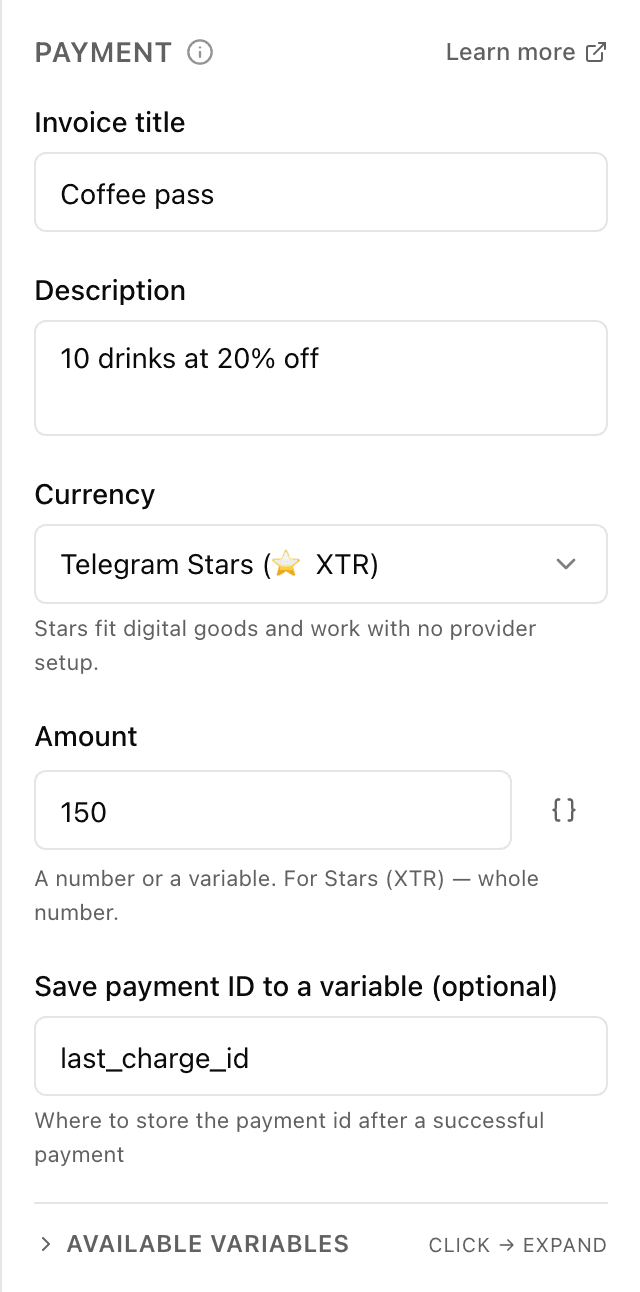
What the "Payment" block does
The block sends the customer an invoice right inside the bot chat — with a title, description and amount. The customer pays in a few taps without leaving Telegram. As soon as the payment goes through, the flow continues down its branch — you can say thanks, create the order or grant access.
Block settings
The block's settings panel — what to fill in:
- Invoice title
- What the customer sees at the top of the invoice in Telegram — for example "Order #{{order_id}}". Up to 32 characters.
- Description
- An explanation of the invoice: what exactly the customer is paying for. Shown under the title. Up to 255 characters.
- Pay with
- Telegram Stars (Telegram's built-in currency) or real money. For real currency the bot needs a payment provider connected.
- Amount
- How much the customer pays. For Stars — a whole number (e.g. 100). For real money — up to two decimals (e.g. 500.00). You can insert a variable {{...}} — then the amount is calculated on the server.
- Save payment id
- Optional: the name of the cell to store the successful payment's id for later steps — for example order_id. Written in Latin letters.
Example: paying for a coffee-shop order
The customer builds a cart, and the "Payment" block shows an invoice "Order #1024" for the order total. After payment the flow thanks the customer and sends the order to the baristas' team chat.
Frequently asked questions
What are Telegram Stars?
It's Telegram's built-in currency: the customer pays with them right in the app, without an external payment provider. Handy for digital goods and small amounts. Telegram requires a bot that sells for Stars to answer the /paysupport command: if you have no scenario for it, the bot replies to the buyer with a standard text on its own.
How do I take real money?
You connect a payment provider to the bot (get a payment token) and choose the real-currency option in the block. The customer then pays by card right inside Telegram.
What happens after payment?
The flow automatically continues from the next step — you can thank the customer, create the order or grant access. The payment id can be saved to a variable for later steps if you wish.
Other blocks in this group
To team chat
The bot sends a message to your team chat or channel. For example, to notify staff about a new request.API request
The bot reaches out to your site or service for data. For example, to check stock levels or create an order in your CRM.AI assistant
The AI answers the customer in its own words, following your instructions and knowledge base. For example, a coffee shop assistant recommends a drink and answers menu questions.Wait for data
Waits until an external service sends an event to a data receiver. For example, wait for an invoice payment and grant access.Launch your Telegram bot with Forgebot
Build your first flow, reply to subscribers and watch analytics — free, no code.
Free plan: 1 bot, 5 flows, 100 subscribers. No card required.