To team chat: the bot notifies your team right in Telegram
What the "To team chat" block does
Ordinary blocks write to the customer; this one writes to your team — a shared chat or channel where staff sit. The customer doesn't see the message. Handy so managers learn about a new request, payment or question straight away and can react fast.
Block settings
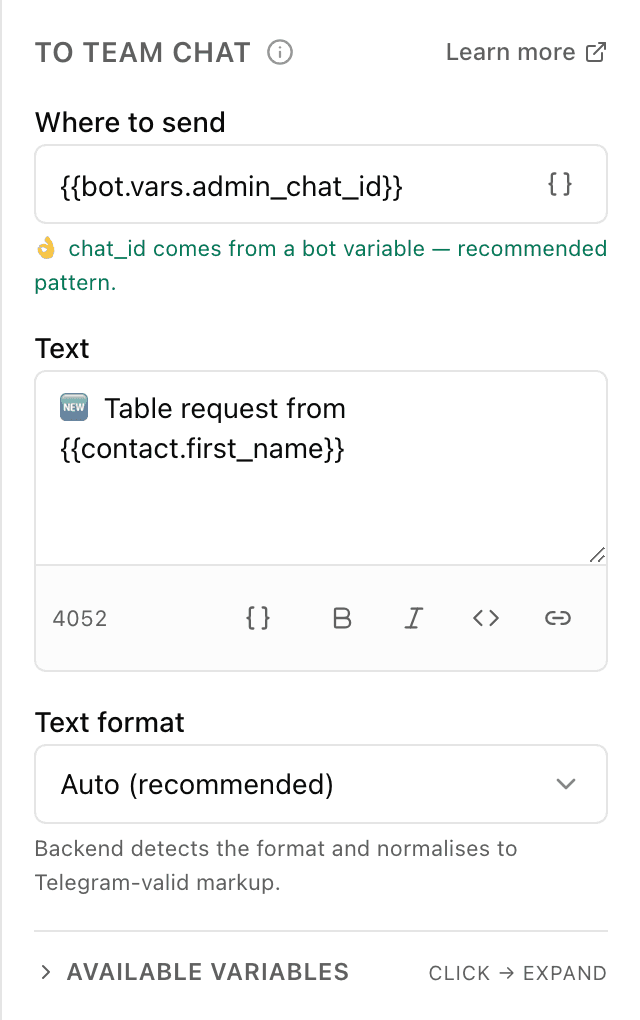
The block's settings panel — what to fill in:
- Where to send
- The chat or channel address: a numeric id (e.g. -1001234567890) or @channel_name. Better to move it into the bot fields and insert it as {{bot.vars.admin_chat_id}} — then you don't retype the id in every block.
- Text
- The message itself for the team. You can insert variables, e.g. "Request from {{contact.first_name}}". Up to 4096 characters, with formatting buttons (bold, links and so on).
- Formatting
- How to mark up the text: automatic, HTML, Markdown, MarkdownV2 or none. Automatic by default.
Example: a new-request alert
A customer leaves a request in the bot. The "To team chat" block posts to the managers' work chat: "🆕 Request from {{contact.first_name}}, phone {{phone}}". The team sees it at once and calls back, while the customer never knows about that message.
Frequently asked questions
How is "To team chat" different from the "Message" block?
"Message" writes to the customer in their private chat with the bot. "To team chat" sends the text to your team chat or channel — staff see it, not the customer. It's for notifying the team, not for talking to the customer.
The message doesn't reach the chat — why?
Most often the bot isn't in that chat or channel. For the bot to post there, you first add it to the chat (and make it an admin for a channel) and give the right id or @name. Check that the id matches that exact chat.
Where do I get the chat id?
It's the numeric identifier of the chat or channel (for groups and channels it usually starts with -100). It's convenient to save it once in the bot fields and insert it into every block via {{bot.vars.NAME}}, rather than typing it by hand each time.
Other blocks in this group
Payment
The bot issues an invoice to pay right in the chat. For example, paying for an order by card or with Telegram Stars.API request
The bot reaches out to your site or service for data. For example, to check stock levels or create an order in your CRM.AI assistant
The AI answers the customer in its own words, following your instructions and knowledge base. For example, a coffee shop assistant recommends a drink and answers menu questions.Wait for data
Waits until an external service sends an event to a data receiver. For example, wait for an invoice payment and grant access.Launch your Telegram bot with Forgebot
Build your first flow, reply to subscribers and watch analytics — free, no code.
Free plan: 1 bot, 5 flows, 100 subscribers. No card required.