AI assistant: the bot answers customers in its own words
What the "AI assistant" block does
Ordinary blocks send pre-written text. The AI assistant reads the customer's message and composes the reply itself — like a consultant you've briefed on who they are and what they know about your business. The block can either answer once and move on, or keep a conversation going until it reaches a goal you set. The customer sees a normal chat message. If the AI can't cope or the customer asks for a human, the block can hand the conversation to a live operator.
Block settings
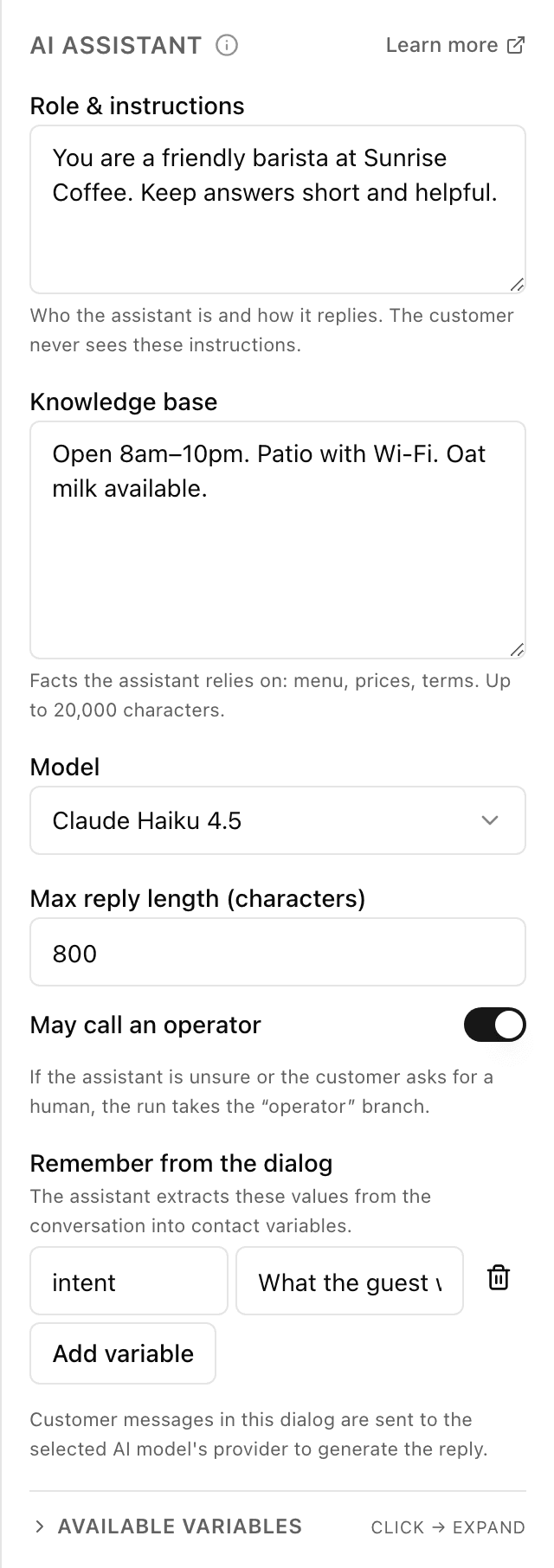
The block's settings panel — what to fill in:
- What the Assistant Does
- "Replies to One Message" — the AI answers once, then the flow moves on ("one reply" on the canvas). "Holds a Conversation Until the Goal Is Met" — the AI answers every customer message until it reaches the goal you set ("conversation" on the canvas).
- When the Goal Is Met
- "Conversation" mode only: briefly describe when the conversation counts as finished — for example "the customer gave a name, phone and time". Up to 1,000 characters; without a goal such a block cannot be published.
- Role & instructions
- Describe who the AI should be in the conversation — for example "a polite coffee-shop barista who recommends drinks and knows the menu by heart". Up to 4,000 characters. The customer never sees these instructions.
- Knowledge base
- Facts about your business the AI relies on: prices, addresses, opening hours, delivery terms. The more detail, the less it improvises. Up to 20,000 characters.
- Provider and model
- Which "brain" answers customers: Anthropic (Claude), OpenAI, Google Gemini, DeepSeek, Alibaba Qwen, xAI, Mistral, Moonshot Kimi or OpenRouter. The list shows the providers you connected a key for in settings, and their models: "Curated Models" and "From Your Provider Account". Some providers run servers in China — the panel warns you about it under the selector.
- May call an operator
- Let the AI bring in a real person when the customer asks for a manager or the AI can't cope — the flow then takes the "operator" output. On by default.
- Remember from the dialog
- A list of details the AI will "pull" from the conversation and save to contact variables for later steps — the customer's budget or preferred date, say. Up to 10 items; the variable name is written in Latin letters.
- AI Reply Limit per Person
- Optional: a number and a period (per minute, per hour or per day). On the free plan Forgebot already caps it at 20 replies a day per person (the field can only lower it); on a paid plan there is no cap by default, but we recommend setting one — otherwise a single person could spend as much as they want on your key.
- New Conversation After Silence (min)
- Shown in "conversation" mode and when memory is on: 1 to 1,440 minutes, 30 by default. If the person stays silent that long, the AI forgets the previous conversation, and in "conversation" mode the conversation ends via "silent/limit". With memory on, "Also on /start" does the same on /start. The reply limit is not reset by this.
- Remember the Chat Between Flow Runs
- In Advanced. Turn it on so the AI remembers the conversation with this person even if the flow restarts — 2 to 50 recent messages. The more messages, the more each reply costs on your key.
- Max AI Replies per Conversation
- In Advanced, "conversation" mode only: up to 25 replies (20 by default), after which the conversation ends via "silent/limit".
- AI Reply
- In Advanced: "Send to the Customer" — the reply goes to the chat and is also saved to {{ai_reply}}; "Save to a Variable Only" — the customer does not see it, it goes to {{ai_reply}} for later blocks (a summary for a manager, a translation). In "conversation" mode — "Send to the Customer" only.
- If the AI Can't Reply, Message the Customer
- In Advanced: the text the customer gets when the AI could not reply (the key failed, credit ran out, a limit was hit). Up to 1,000 characters, plain text; empty — nothing is sent.
- Max reply length (characters)
- In Advanced: the maximum characters in a single AI reply — 50 to 3,500, 800 by default. Keeps answers short and to the point.
Example: a coffee-shop consultant
A customer writes "what's mild and sugar-free?". From the knowledge base the AI suggests an oat-milk flat white and asks what time to have it ready. When the customer asks for an invoice or a manager, it hands the chat to an operator.
Frequently asked questions
Will the AI make things up?
The AI relies on the role and knowledge base you set. The more precisely you fill them in, the less it improvises: facts like prices and addresses come from the knowledge base, not invention. It's best not to put customers' private data into the knowledge base.
How much does it cost, and how do I get a key?
Replies are paid from your account with the provider at its prices: the block runs only on your company's own key, there are no keys of ours in flows. Set a spending limit in the provider's dashboard. On Forgebot's free plan — up to 100 AI replies a day per company.
How to get a key from each of the 9 providers →What if the key stops working or the provider account runs out of credit?
The flow does not break: the block takes the "error" branch, and the reason is in the {{last_ai_error.reason}} variable — use it to reply to the customer or call an operator. If "error" is left unconnected, the bot continues on its own: in "one reply" mode as if the AI answered, in "conversation" mode as if the customer went silent; the customer gets only the text from "If the AI Can't Reply, Message the Customer", if you filled it in. A rejected key is not called again until you replace it.
Other blocks in this group
Payment
The bot issues an invoice to pay right in the chat. For example, paying for an order by card or with Telegram Stars.To team chat
The bot sends a message to your team chat or channel. For example, to notify staff about a new request.API request
The bot reaches out to your site or service for data. For example, to check stock levels or create an order in your CRM.Wait for data
Waits until an external service sends an event to a data receiver. For example, wait for an invoice payment and grant access.Launch your Telegram bot with Forgebot
Build your first flow, reply to subscribers and watch analytics — free, no code.
Free plan: 1 bot, 5 flows, 100 subscribers. No card required.