Message: the bot sends the customer ready-made text
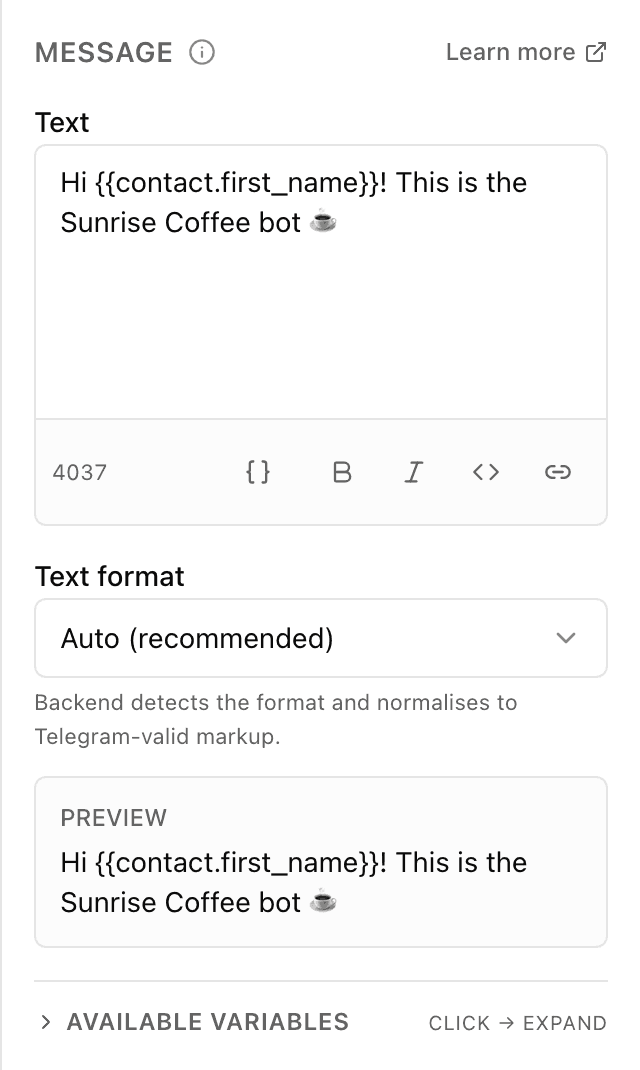
What the "Message" block does
The block sends text you've written in advance straight into the bot chat. You type it in the panel, optionally make it bold or italic, add links and insert variables such as the customer's name — a preview under the field shows exactly how it will look in Telegram. The customer sees a normal message and reads it as if from a live person.
Block settings
The block's settings panel — what to fill in:
- Text
- The message itself, as the customer will see it. You can make it bold or italic, add links and insert variables — for example "Hello, {{contact.first_name}}!". Up to 4096 characters.
- Text format
- How the bot reads the markup in your text: "Auto" (recommended) — the bot normalises the formatting itself; or HTML, Markdown, MarkdownV2 for manual control; or "No formatting" — then the markup characters reach the customer as-is.
Example: a coffee-shop greeting
The moment the customer starts the bot, the "Message" block writes: "Hello, {{contact.first_name}}! This is the bot of the coffee shop on Pushkin St — I'll help you pick a drink and place an order." The customer reads the greeting and instantly knows where they are.
Frequently asked questions
Can I insert the customer's name?
Yes. Put the variable {{contact.first_name}} into the text and the bot fills in the customer's real name from their profile. If there's no name, the spot is left blank, so write the phrase so it reads well without it too.
Why does bold text show up with asterisks?
Most likely "Text format" is set to "No formatting" — then the markup characters reach the customer literally. Switch to "Auto" and the formatting will work again.
How is "Message" different from the "Buttons" block?
"Message" simply sends text and moves straight on through the flow. "Buttons" shows text with choice buttons underneath and waits for the customer to tap one. Use "Message" when no reply from the customer is needed.
Other blocks in this group
Media
The bot sends a photo, video, GIF, audio or document with a caption. For example, a photo of the menu or a price list in PDF.Buttons
A message with buttons to choose from — each button leads down its own path. For example: Menu, Opening hours, Call a manager.Delete message
Deletes the last message from the bot to keep the chat tidy. For example, remove the button menu after the customer has chosen.Launch your Telegram bot with Forgebot
Build your first flow, reply to subscribers and watch analytics — free, no code.
Free plan: 1 bot, 5 flows, 100 subscribers. No card required.