Media: the bot sends a photo, video or document
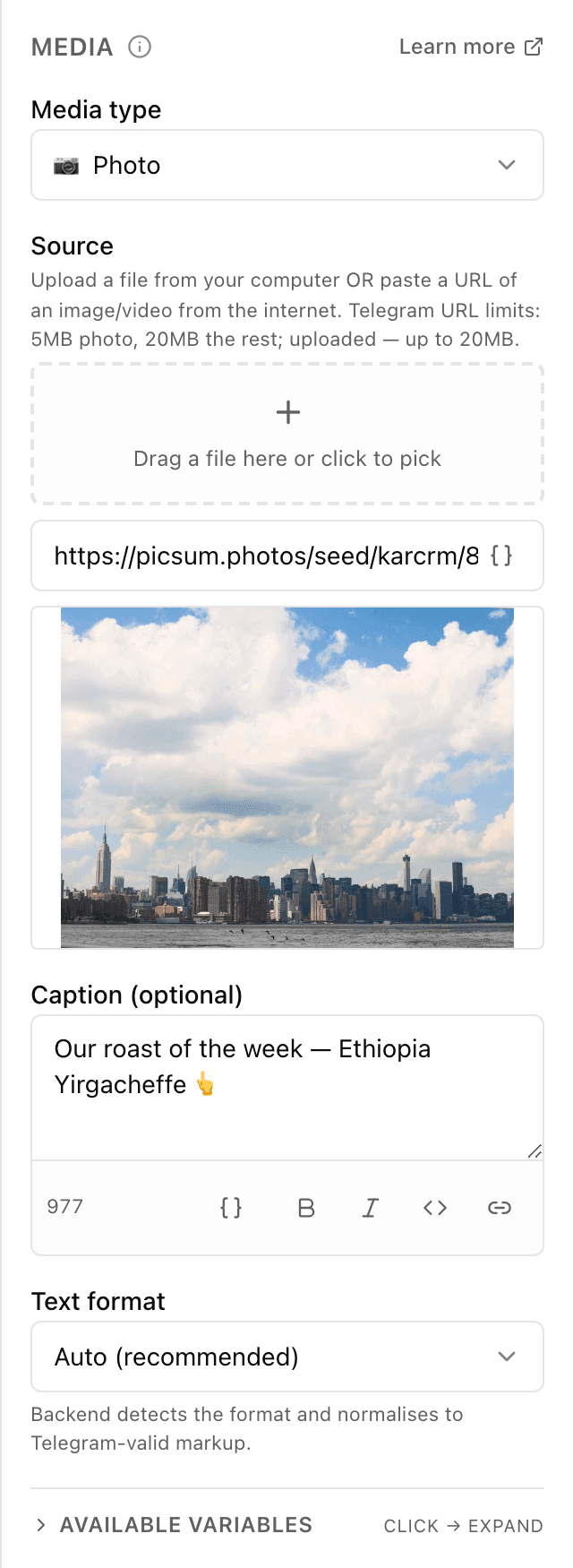
What the "Media" block does
The block sends the customer an attachment right into the chat — a photo of a dish or a price list in PDF, for example. You choose the file type, upload it or paste a link, and optionally add a formatted caption. The customer gets an ordinary media message they can view or download without leaving Telegram.
Block settings
The block's settings panel — what to fill in:
- Media type
- What exactly you're sending: photo, video, GIF, audio, voice message or document. The choice decides how the file appears to the customer in the chat.
- Source
- Where the file comes from: upload it from your computer or phone (up to 20 MB), or paste a link to a file on the internet. For links, Telegram's limits apply: 5 MB for photos and 20 MB for everything else.
- Caption
- Optional text under the file — what's in the photo or the terms of an offer, say. You can format it and insert variables like the customer's name. Up to 1024 characters.
- Text format
- How the bot reads the markup in the caption: "Auto" (recommended), HTML, Markdown, MarkdownV2 or "No formatting". Works the same way as in the "Message" block.
Example: a menu photo
The customer taps "Show the menu", and the "Media" block sends a photo of the counter with the caption "Today's menu — take your pick!". The customer studies the photo right in the chat and moves on to ordering.
Frequently asked questions
How large a file can I send?
If you upload a file — up to 20 MB. If you give a link, Telegram's limits apply: 5 MB for photos and 20 MB for everything else. Heavier files are best compressed or re-uploaded at a lower quality.
How is "Voice" different from "Audio"?
"Audio" is a music file or track — it shows up as an audio recording with a title. "Voice" arrives as a voice message, as if dictated into the chat. Pick by how you want it to look to the customer.
How is "Media" different from the "Message" block?
"Message" sends text only. "Media" sends a file — a photo, video or document — with an optional caption. Use "Media" when a picture or a PDF explains it faster than words.
Other blocks in this group
Message
The bot sends a text message. For example: Hi! How can we help?Buttons
A message with buttons to choose from — each button leads down its own path. For example: Menu, Opening hours, Call a manager.Delete message
Deletes the last message from the bot to keep the chat tidy. For example, remove the button menu after the customer has chosen.Launch your Telegram bot with Forgebot
Build your first flow, reply to subscribers and watch analytics — free, no code.
Free plan: 1 bot, 5 flows, 100 subscribers. No card required.