Call operator: hand the conversation to a real person
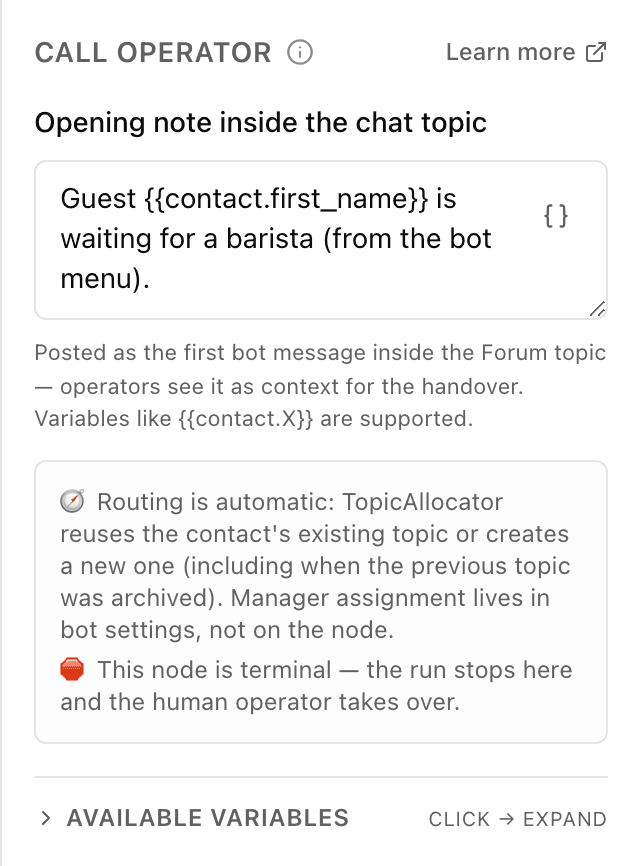
What the "Call operator" block does
The block switches the conversation from automatic mode to a live staff member: the customer's chat lands in the chats section, where an operator picks it up. The customer stays in the same chat with the bot and simply starts getting answers from a person. This is a final block — the flow stops here and the operator takes over.
Block settings
The block's settings panel — what to fill in:
- Opening note inside the chat topic
- Optional: the first message operators see inside the work chat — a context hint for the handover. The customer doesn't see it. You can insert the customer's details with variables like {{contact.field_name}}, for example {{contact.first_name}}.
Example: the customer asks for a manager
A customer writes "I want to talk to a human". The flow leads them to the "Call operator" block, a note "Customer {{contact.first_name}} is waiting" goes into the chat topic, and a manager continues the conversation.
Frequently asked questions
What happens to the bot after the handover?
The bot goes quiet: this is a final block, the flow stops here and no automated messages follow. From then on a live operator talks to the customer in the chats section.
Who gets the opening note — the customer or the operator?
The operator. It's a context hint that appears as the first message inside the work chat, so the staff member instantly knows who was handed over and why. The customer doesn't see it.
How do I choose which manager gets the conversation?
That isn't set on the block — operator assignment is configured in the bot's settings. The bot finds the customer's existing chat on its own or creates a new one, including when the previous one was already closed.
Other blocks in this group
Start
The entry point where the bot starts guiding a person through the scenario. For example, when a customer first taps Start in the bot.Sub-flow
Runs another of your scenarios as a part of this one. For example, move address collection into a separate scenario and reuse it.End
Ends the scenario — no more automatic messages after this. For example, thank the customer for the order and finish.Launch your Telegram bot with Forgebot
Build your first flow, reply to subscribers and watch analytics — free, no code.
Free plan: 1 bot, 5 flows, 100 subscribers. No card required.