Subscription check: a bonus for members only
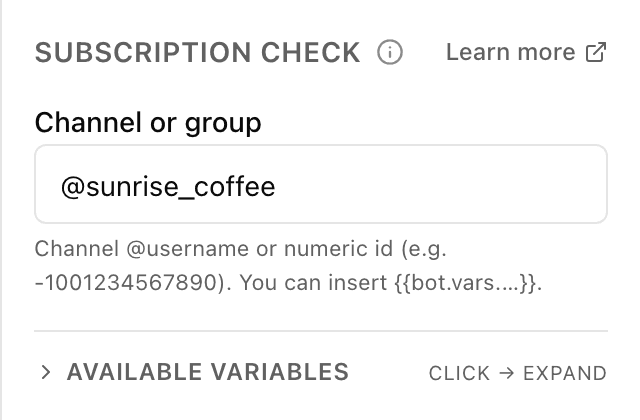
What the "Subscription check" block does
The block asks Telegram whether the person is in your channel or group and, based on the answer, sends them down the "subscribed" or "not subscribed" branch. That lets you unlock a bonus for members only and gently ask everyone else to subscribe first. For the check to work, the bot must be an admin of that channel.
Block settings
The block's settings panel — what to fill in:
- Channel or group
- Where to look when checking the subscription. Enter the channel @username (for example @my_channel) or its numeric id (for example -1001234567890) — not a link. You can insert a variable {{bot.vars.…}}. Bot secrets can't be inserted.
- The bot is a channel admin
- Below the field the block reminds you: the bot must be an admin of the given channel or group. Without admin rights Telegram won't answer the check, and the customer will always land on the "not subscribed" branch.
Example: a promo code for subscribing
The field holds @my_channel. Anyone already subscribed follows the "subscribed" branch and gets the promo code. Anyone who isn't — the "not subscribed" branch, where the bot shows a link to the channel, asks them to subscribe, then check again.
Frequently asked questions
Why does the check always show "not subscribed"?
Most likely the bot isn't a channel admin: without those rights Telegram won't report who's subscribed, and the block sends everyone down the "not subscribed" branch. Add the bot as a channel admin and try again.
What do I put in the field — a link to the channel?
Not a link, but the channel @username (for example @my_channel) or its numeric id (for example -1001234567890). You can insert a bot variable {{bot.vars.…}}. Bot secrets can't be put in this field.
Can it check a subscription to a private channel?
Yes, if the bot is an admin of that channel. Private channels have no @username, so use the numeric id (it starts with -100). You can't check a subscription to someone else's channel where the bot isn't an admin — the result will always be "not subscribed".
Other blocks in this group
Branch
A fork on a single condition: yes or no. For example, if the order total is over 500, offer free delivery.Conditions
Several conditions at once — the scenario follows the matching path. For example, split customers by their chosen plan: start, business, pro.A/B test
Randomly splits people into groups to compare options. For example, show half one greeting and half another, then see which works better.Launch your Telegram bot with Forgebot
Build your first flow, reply to subscribers and watch analytics — free, no code.
Free plan: 1 bot, 5 flows, 100 subscribers. No card required.