Branch: the flow goes "yes" or "no"
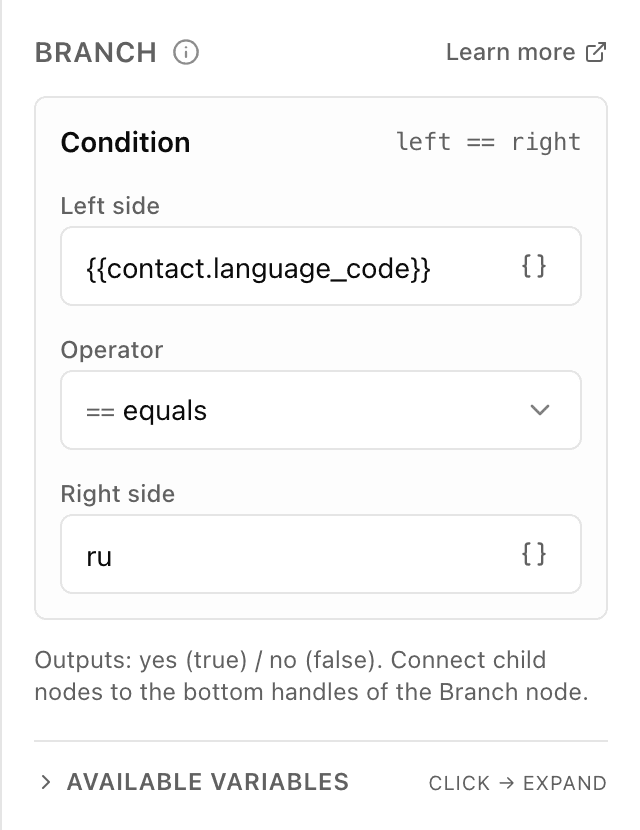
What the "Branch" block does
The block takes a left value, compares it with the right one by the rule you pick, and decides: does the condition hold or not. If yes — the flow follows the "yes" branch; if not — the "no" branch. The customer chooses nothing and never sees the check: they simply get the message sitting on the matching branch.
Block settings
The block's settings panel — what to fill in:
- Left side
- The value being checked. Usually a variable — for example {{user_input.text}} (what the customer typed) or {{order_total}} (the order total). Plain text works too.
- Comparison
- The rule the values are checked by. Twelve options to choose from: equals, not equals, contains, does not contain, starts with, ends with, is empty, is not empty, greater than, greater or equal, less than, less or equal. The "greater/less" comparisons read the values as numbers.
- Right side
- What the left side is compared against — a number or text, for example 500 or "pro". The "is empty" and "is not empty" rules need no second value, so the field is hidden.
Example: free delivery
Left is {{order_total}}, comparison "greater than", right is 500. If the order total is over 500, the customer follows the "yes" branch and gets a free-delivery promo code; if it's less — the "no" branch with a plain goodbye.
Frequently asked questions
How is "Branch" different from the "Conditions" block?
"Branch" checks one condition and gives exactly two outputs — "yes" and "no". The "Conditions" block can check several rules at once and lead the customer down many branches. Two branches — use "Branch"; more — use "Conditions".
How do I compare numbers rather than text?
Pick "greater than", "less than", "greater or equal" or "less or equal" — these rules read the values as numbers, so 1000 is greater than 500. The "equals" rule compares the values as text, letter for letter.
Why does the customer always take the "no" branch?
Usually the left field points at a variable that's still empty, or you're comparing text where a number is expected. Check that the left side has a value, and that "greater/less" is chosen for numbers. "Equals" needs a full match — even an extra space makes the condition fail.
Other blocks in this group
Conditions
Several conditions at once — the scenario follows the matching path. For example, split customers by their chosen plan: start, business, pro.A/B test
Randomly splits people into groups to compare options. For example, show half one greeting and half another, then see which works better.Subscription check
Checks whether the person is subscribed to your channel or group. For example, give a bonus only to subscribers.Launch your Telegram bot with Forgebot
Build your first flow, reply to subscribers and watch analytics — free, no code.
Free plan: 1 bot, 5 flows, 100 subscribers. No card required.