A/B test: randomly splits customers into groups
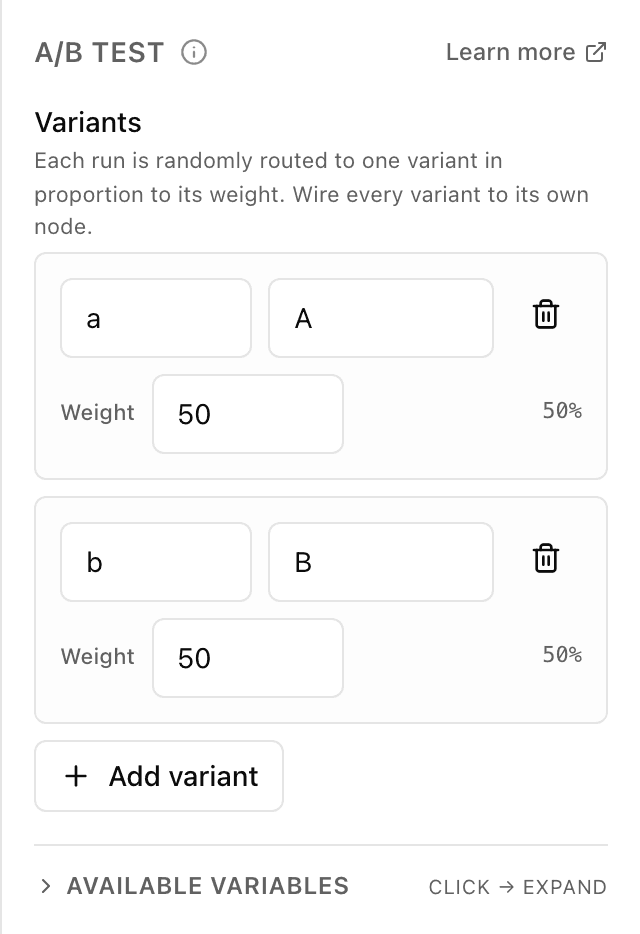
What the "A/B test" block does
The block splits the stream of customers into groups at random. You set the variants and their "weights" — the higher the weight, the more often a customer lands in that variant. Each variant leads down its own branch, so you can show one group one message and another group a different one, then compare the outcome. The customer doesn't know they're in a test: to them it's an ordinary chat.
Block settings
The block's settings panel — what to fill in:
- Variants
- The list of groups customers are split between. Each row is one variant with its own branch on the canvas.
- Variant id
- A short technical name that wires the variant's branch to the next step. A new variant is given a free letter (a, b, c…) automatically; a blank name isn't saved.
- Variant name
- A human-friendly name to tell the branches apart — for example "Short greeting". It can be left empty.
- Weight
- How often customers land in this variant compared with the others: a bigger number means more often. A whole number no less than 0; next to it the bot shows the resulting share as a percent. If every variant has weight 0, the shares split equally.
- Add / remove variant
- "Add variant" creates a new row with weight 50, the trash icon removes an extra one. You can have up to 10 variants — on the tenth the add button disappears.
Example: two greetings
Two variants with weights 50 and 50 — the bot shows half the customers greeting "A" and half greeting "B", and each branch leads to its own offer. A week later you can see which greeting brought more people to an order.
Frequently asked questions
How do I split unevenly, say 70 to 30?
Give one variant a weight of 70 and the other 30 — the bot shows the shares "70%" and "30%" next to them and distributes customers in that ratio. What matters is the ratio of the weights, not their sum.
How is "A/B test" different from "Branch"?
"Branch" picks a path deliberately — by a condition (order total, the customer's reply). "A/B test" splits customers at random, regardless of who they are, to compare the variants fairly.
How many variants can I have, and what happens at weight 0?
Up to 10 variants — after that the add button disappears. If every variant is set to weight 0, the block splits customers equally between them; a weight can't be negative.
Other blocks in this group
Branch
A fork on a single condition: yes or no. For example, if the order total is over 500, offer free delivery.Conditions
Several conditions at once — the scenario follows the matching path. For example, split customers by their chosen plan: start, business, pro.Subscription check
Checks whether the person is subscribed to your channel or group. For example, give a bonus only to subscribers.Launch your Telegram bot with Forgebot
Build your first flow, reply to subscribers and watch analytics — free, no code.
Free plan: 1 bot, 5 flows, 100 subscribers. No card required.