Wait until: the flow resumes at the right hour or day
What the "Wait until" block does
The block waits not for a set interval but for a specific point on the clock or calendar. Until that moment the bot stays quiet and the customer sees nothing. As soon as the time arrives, the flow moves on — handy for sending at the same hour every day or firing something on a set date.
Block settings
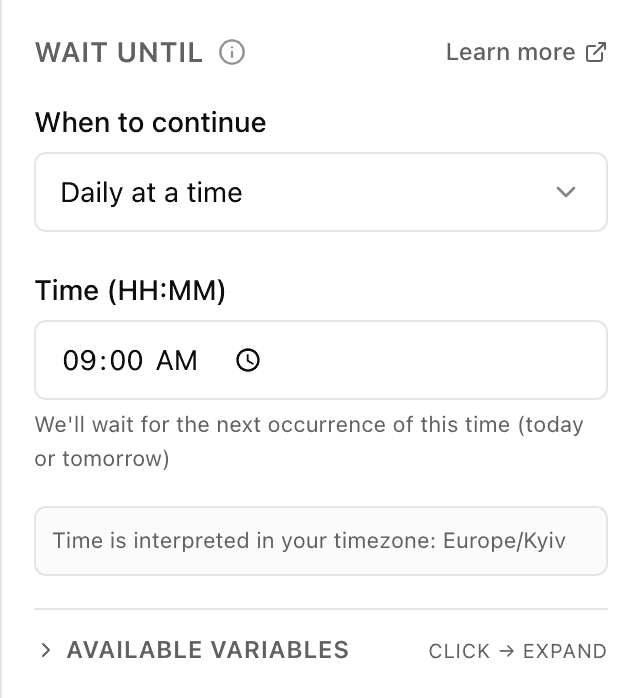
The block's settings panel — what to fill in:
- When to continue
- A choice of two: "Daily at a time" — wait for the next occurrence of a time of day; "A specific date & time" — wait for one particular moment.
- Time (HH:MM)
- What time to continue, in hours:minutes (e.g. 09:00). The bot waits for the next occurrence of this time — today or tomorrow. Shown for the "Daily at a time" option.
- Date & time
- A specific moment — a date and a time (e.g. 2026-12-25T09:00), the flow pauses until then. No more than 30 days ahead; if the moment has already passed, the flow continues right away. Shown for the "A specific date & time" option.
- Timezone
- An info line: it shows which timezone the wait is calculated in. It is set automatically from your browser and can't be changed in the block.
Example: a morning broadcast
The broadcast flow reaches a "Wait until" block set to "Daily at a time" with 09:00. The bot waits for the next nine in the morning and only then sends the message to customers — at breakfast, not in the middle of the night.
Frequently asked questions
How is "Wait until" different from "Pause"?
"Pause" counts an interval from the current moment — "in 3 hours". "Wait until" waits for a specific point — "until 9:00" or "until 25 December". Need a fixed hour or date — use this block; need just an interval — use "Pause".
What if the moment I set has already passed?
For a specific date and time the flow won't hang — if the moment is in the past, the bot continues from the next step right away. For "Daily at a time" the bot takes the next occurrence of that time: today if it hasn't passed yet, otherwise tomorrow.
Which timezone is the time calculated in?
Your timezone — the block detects it automatically from your browser and shows it under the settings. So "9:00" means nine in the morning your time, not UTC.
Other blocks in this group
Launch your Telegram bot with Forgebot
Build your first flow, reply to subscribers and watch analytics — free, no code.
Free plan: 1 bot, 5 flows, 100 subscribers. No card required.