Pause: the bot waits the right amount of time before the next step
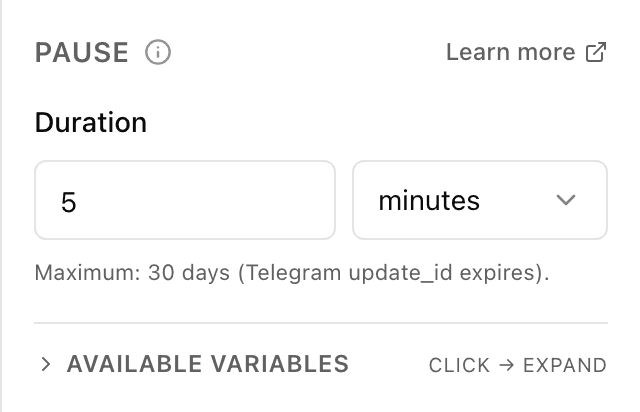
What the "Pause" block does
The block simply waits the set time and then passes control on down the flow. The customer sees nothing meanwhile — the bot stays quiet while the countdown runs. When the time is up, the flow continues: you can send a reminder, a question or the next warm-up message.
Block settings
The block's settings panel — what to fill in:
- Duration
- The number — how long to wait. The minimum is 1. The overall cap for a pause is 30 days: that's how long Telegram keeps the customer's original message, so you can't wait longer.
- Time unit
- What to count the pause in: seconds, minutes, hours or days. Picked from the list next to the number — "2" and "hours", say, means a two-hour pause.
Example: a follow-up after an order
Right after an order is placed, the flow passes through a "Pause" block for 1 hour, and then the bot asks the customer whether everything is fine and they liked it. Without the pause the question would arrive instantly — and feel out of place.
Frequently asked questions
How is "Pause" different from "Wait until"?
"Pause" counts a span from the current moment — "in 2 hours", "in 3 days". "Wait until" waits for a specific point on the clock or calendar — "until 9:00" or "until 25 December". Need a fixed hour — use "Wait until"; need an interval — use "Pause".
What's the maximum pause?
30 days. It's a hard limit: beyond that Telegram no longer keeps the customer's original message, so there'd be nothing to continue the flow from. Choose more and the bot won't set such a pause.
Will the customer see that the bot is paused?
No. While the countdown runs the bot simply stays silent — no "typing…" or system messages. The customer only notices the next message, once the pause is over.
Launch your Telegram bot with Forgebot
Build your first flow, reply to subscribers and watch analytics — free, no code.
Free plan: 1 bot, 5 flows, 100 subscribers. No card required.